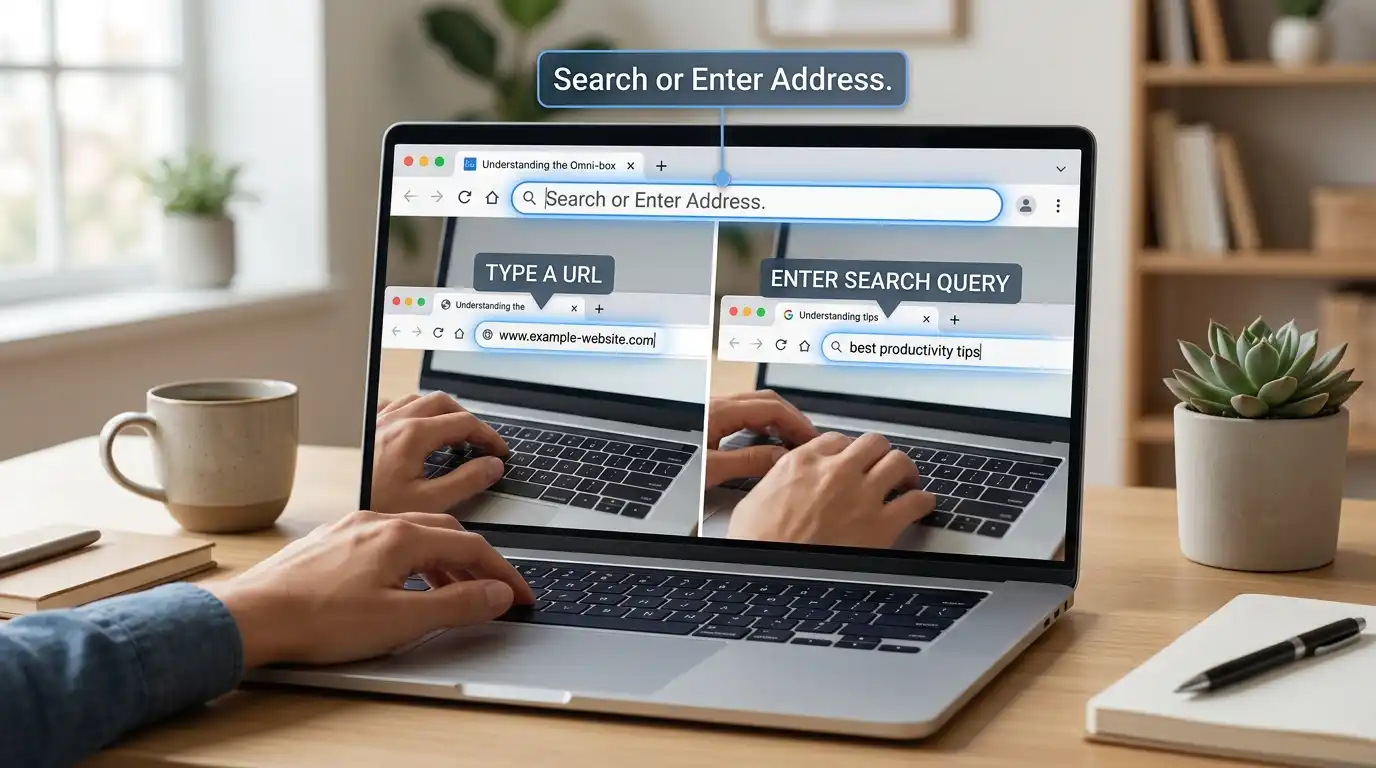
You open your browser. A box sits at the top. It says “search or enter address.” You freeze for a second. Do you type a website? Do you ask a question? Will it break if you pick wrong?
You are not alone. People look up this phrase every day. It shows up on new phones, new laptops, and after browser updates. The words are short, but the meaning is not clear at first.
Many people think the box is only for web links. Others think it is a Google page. Some are not sure why it looks different in Chrome, Firefox, or Safari.
Here is the good news. The answer is simple. This box does two jobs. It opens websites, and it searches the web. You do not have to choose. Your browser figures out what you mean.
In this article, you will learn what the phrase means, where it comes from, and how to use it. You will also see common mistakes and easy fixes. By the end, you will type in that box with total confidence.
Search or Enter Address Quick Answer
“Search or enter address” is the hint text in your browser’s address bar. It tells you that you can do one of two things:
- Search: Type words like “best pizza near me” and press Enter. The browser sends your words to a search engine.
- Enter an address: Type a web address like “wikipedia.org” and press Enter. The browser goes straight to that site.
Examples:
- Type weather today → you get search results.
- Type bbc.com → you go to the BBC site.
- Type how to tie a tie → you get search results.
That is all it means.
The Origin of Search or Enter Address
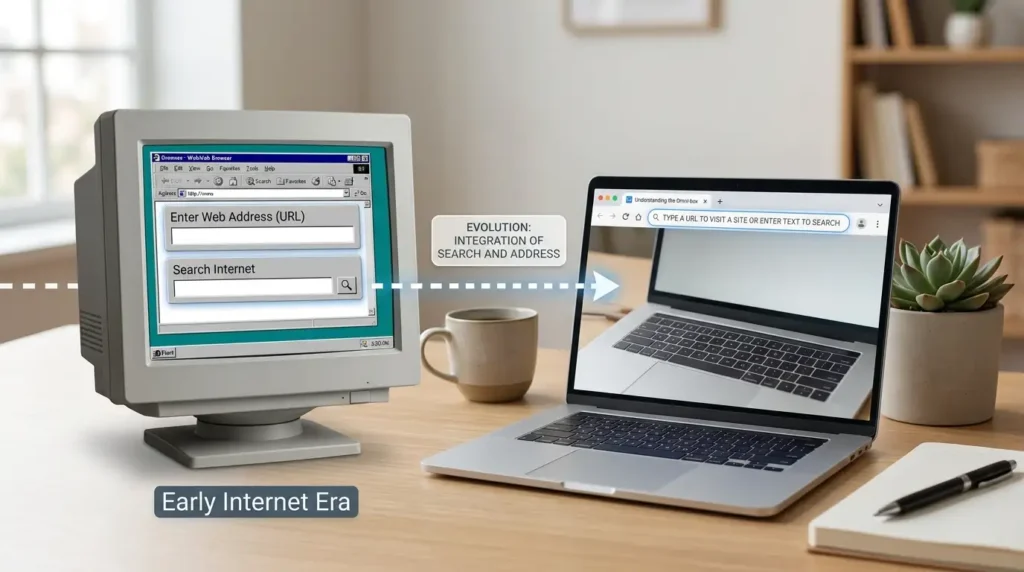
Early browsers had two boxes. One was for web addresses. The other was for search. That was confusing.
Later, browsers joined them into one box. Firefox calls this the “Awesome Bar.” Chrome calls it the “Omnibox.” One box now does both jobs.
Because the box does two jobs, it needs a hint that says so. So browser makers wrote short phrases like “search or enter address.”
There is no spelling fight here. The word “address” is spelled the same in the US and the UK. The phrase changes because each company picks its own words. That is why you see many versions.
Browser Wording: What You See and Why It Differs
Since there is no British or American spelling gap, the real difference is browser wording. Here is how the hint often reads:
| Browser | Typical hint text |
| Firefox | Search or enter address |
| Chrome | Search Google or type a URL |
| Safari | Search or enter website name |
| Microsoft Edge | Search or enter web address |
Wording can change with updates, so your screen may differ a little.
Spelling notes:
- “Address” is the same in US and UK English.
- “Adress” (one “d”) is a common typo. It is wrong in both.
- Some people write “web-address” or “webaddress.” The correct form is two words: “web address.”
Which Wording Should You Use?
If you are writing help guides or instructions, match what your reader sees.
- Firefox users: Say “search or enter address.”
- Chrome users: Say “search or type a URL.”
- Mixed or global readers: Say “address bar” or “the box at the top of your browser.” This works for everyone.
- US, UK, and Commonwealth readers: No change is needed. The spelling is the same.
If you are a regular user, you do not need to choose. Just type in the box.
Common Mistakes with Search or Enter Address
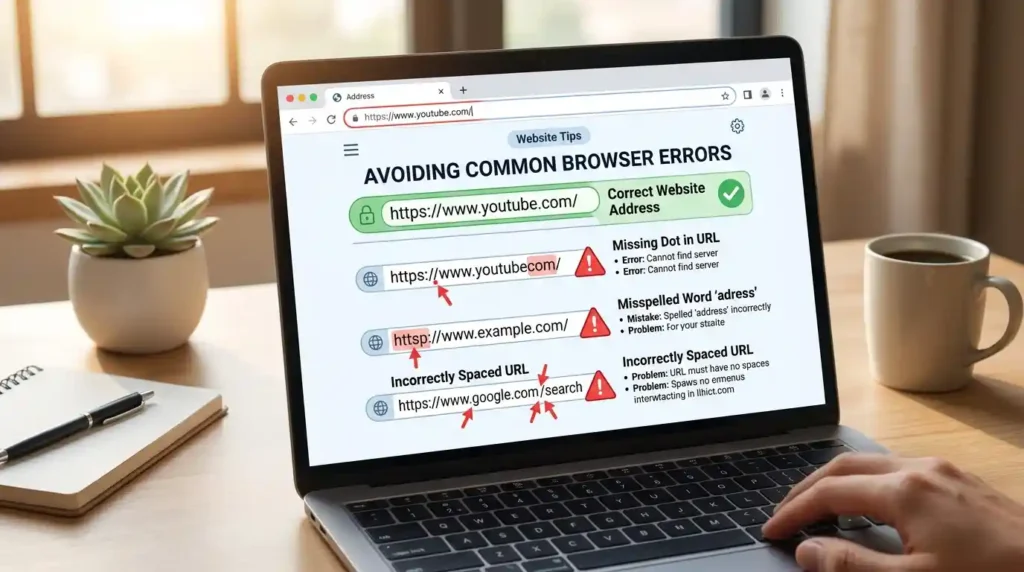
Mistake 1: Typing a web address into a search site.
Some people go to Google first and then type “facebook.com.” You can skip that step. Type it in the address bar.
Mistake 2: Thinking it only takes web links.
It also takes plain questions and words.
Mistake 3: Missing the dot.
Typing “youtubecom” gives search results, not YouTube. Write “youtube.com.”
Mistake 4: Typing a space in an address.
Web addresses have no spaces. A space makes the browser treat it as a search.
Mistake 5: Spelling it “adress.”
Correct: address. Two d’s.
Mistake 6: Mixing up the address bar and the search page.
The bar is at the top of the window. A search page is a website inside the window.
Search or Enter Address in Everyday Examples
In an email (help desk):
“Please click the box at the top of your browser. Type your bank’s name or web address there.”
In the news:
“Millions of users now type questions straight into the address bar instead of visiting a search site.”
On social media:
“Tip: You don’t need to open Google. Just type in the address bar. It works the same.”
In formal writing:
“The address bar accepts both web addresses and search terms. It sends the input to the default search engine when it does not detect a valid address.”
In a phone tutorial:
“Tap the bar at the top. Type a word or a site name. Tap Go.”
Search or Enter Address Google Trends & Usage Data

I can’t pull live numbers here, so I won’t invent any. You can check them yourself in Google Trends. Here is what to expect and how to read it.
- Who searches it: Mostly new browser users, people on new phones, and people who just switched browsers.
- Where: Interest is usually strongest in countries with many new internet users and many mobile users. English-speaking countries also show steady interest.
- When: Searches often rise after a browser update or a new device launch.
- Why: People land on this phrase when they see it on screen and want to know what it means, or when a page looks wrong.
How to check: Go to trends.google.com, type “search or enter address,” and compare countries and time ranges.
Keyword Variations Side by Side
| Variation | Meaning | Correct? |
| search or enter address | Firefox-style hint text | Yes |
| search or type a URL | Chrome-style hint | Yes |
| search or enter web address | Edge-style hint | Yes |
| search or enter website name | Safari-style hint | Yes |
| search or enter adress | Misspelled | No |
| search or enter address bar | Mixed phrase | Not exact, but common |
FAQs
What does “search or enter address” mean?
It means you can type a search or a web address into the box. Both work.
Is it a Google search box?
No. It is your browser’s bar. It uses the search engine you set as your default.
Can I change the search engine?
Yes. Open your browser’s settings and look for “Search.” Pick Google, Bing, DuckDuckGo, or another.
Why does it say something different in Chrome?
Each browser company picks its own words. The box works the same way.
Do I need to type “www” or “https”?
No. Most browsers add them for you. Type “wikipedia.org” and press Enter.
Why did my address turn into a search?
The browser did not see a valid address. Check for typos, missing dots, or spaces.
Is “address” spelled differently in the UK?
No. It is “address” everywhere.
Is my search private?
The browser sends your words to your search engine. Use private mode or a private search engine for more privacy.
Conclusion
“Search or enter address” is a small hint with a clear job. It tells you the box at the top of your browser does two things. You can type a web address to visit a site. You can type words to search the web. The browser decides which one you mean.
Here are the key points to remember. First, you do not need to open a search site before you search. Just use the bar. Second, browsers use different wording, but the box works the same in all of them. Third, the spelling of “address” is the same in American and British English, so there is nothing to switch. Fourth, most problems come from small errors, like a missing dot, a space, or the typo “adress.”
If you write help content, use the wording your readers see, or say “address bar” for a global audience. If you are a user, just type and press Enter. It is that simple. Next time you see the hint, you will know exactly what to do.

I’m Raheela Rani, a professional content writer and author with 3 years of experience in writing, editing, and storytelling. Through VisitLivo.com, I create clear, engaging, and well-crafted content that helps readers learn, connect, and communicate with confidence.